A smart trainer you can control lets you feel the gradient, the cobbles and the draft on a wheel. A device that only measures still lets you ride: you change gear. The brand matters less than the protocol it speaks.
What your legs feel.
The time is always calculated with everything: gradient, wind, road surface and draft. This table only shows what you feel through the pedals, depending on the protocol your smart trainer speaks.
Everything goes through Bluetooth. The brands mentioned are examples of devices that speak these protocols, with no guarantee for every model or firmware: the session page tells you what yours provides.
Smart trainers controlled by FTMS
The standard protocol of connected smart trainers, spoken by most recent models. It is the one that lets you feel everything.
It receives the segment’s gradient, in full or softened to 75 or 50%; the wind, the draft on a wheel and the rolling resistance of the moment (cobbles, gravel, dirt); the power to hold during a structured workout.
It provides power, cadence and speed.
For example: Zwift Hub, Tacx NEO and Flux, Elite Suito and Direto, Saris H3, recent Wahoo KICKR models.
Wahoo KICKR, in their own protocol
When a KICKR does not speak FTMS, or accepts it without applying the gradient, Sillage switches to Wahoo’s own protocol. Wahoo does not document it: Sillage speaks it based on GoldenCheetah and Auuki, two open-source programs.
It receives the gradient at every change, and the power to hold in ERG mode. Air and rolling resistance only at the start; the draft, not at all.
It provides power and cadence.
For example: KICKR, KICKR CORE, KICKR SNAP, KICKR BIKE.
Power meters
A sensor that speaks Cycling Power over Bluetooth: pedals, a crankset, or a smart trainer that only reports its power.
It provides power, and cadence when it counts crank revolutions.
With a controlled smart trainer, power and cadence come from the sensor, and the trainer holds the gradient: the same numbers outdoors and indoors. If the sensor goes quiet or drops out, the trainer takes over, and the page says so.
On its own, it is enough to ride on a classic trainer or on rollers: nothing is controlled, you change gear, for the gradient as for a structured workout.
Classic trainers
A trainer that cannot be controlled and measures nothing, magnetic or fluid. A Bluetooth speed sensor on the rear wheel (Cycling Speed and Cadence) and the curve of your model together give an estimated power.
You choose your model and its lever setting, among 68 curves, then your tyre. The lever is set before you start and stays put.
It is an estimate: tyre pressure and how tightly the roller is set shift it by ten per cent or more. Your times are marked “estimated power” and ranked with the other indoor times.
Nothing is controlled: you change gear, for the gradient as for a structured workout. A power meter, if you have one, takes precedence over the estimate.
The curves come from GoldenCheetah, which takes them from manufacturers or published measurements, with no guarantee for each unit. For example: CycleOps Fluid 2, JetFluid Pro and Magneto Pro; Elite Qubo Power Fluid, Turbo Muin, Crono Fluid and Crono Mag, Supercrono Power Mag and the Arion Mag rollers; Kinetic Road Machine and Cyclone; Minoura V100, V130 and V270; Saris PowerBeam Pro; Tacx Blue Twist, Blue Motion, Flow, Satori, Sirius and Magnetic T1820; Blackburn Tech Fluid.
Heart
A strap, an armband or a watch that broadcasts heart rate over Bluetooth.
It provides heart rate, which stays with your effort.
During a live meetup, it is never sent to the others. In a replayed race of your group, it shows with your effort.
For example: Polar H10, Wahoo TICKR, Garmin HRM-Dual and HRM-Pro.
Treadmills
A running segment can be run at home, against your group’s efforts.
An FTMS treadmill provides speed, distance and incline, and receives the segment’s incline, between −3 and 15%: in full, at half or flat. You set the speed; the page never starts the belt.
A foot pod (Running Speed and Cadence) provides speed and cadence, without incline.
These times are ranked separately, “on the treadmill”.
For example, for stride: Stryd.
The screens.
Comparing and replaying works everywhere. The smart trainer needs Bluetooth: the browser’s, which only Chrome and Edge offer, or that of the Sillage app, which handles it itself.
Your screen
Compare and replay
Ride on a smart trainer
Chrome or Edge on a computerWindows, macOS, ChromeOS
Yes
Yes
Safari or Firefox
Yes
No: no Bluetooth in the browser
Chrome on Android
Yes
Yes
iPhone and iPadWhatever the browser
Yes
No: no Bluetooth in the browser
Sillage appsAndroid, on Google Play; iPhone and iPad, in beta
Yes
Yes: they handle Bluetooth themselves
Before you start, the page checks.
You know what the session receives, and from which device, before the first pedal stroke.
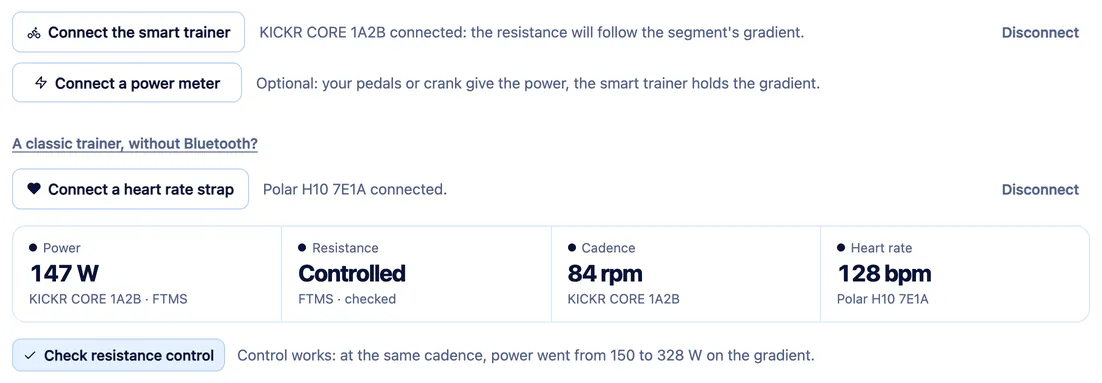
Four boxes: power, resistance, cadence and heart (on a treadmill: speed, incline, cadence and heart). Each one says what it receives and from which device: received, expected, lost, no device, or not provided by the device.
Check resistance control: the page sends an 8% gradient for five seconds, then tells you what the device answered, and whether the power went up at the same cadence.
Wahoo’s protocol, if needed: when FTMS accepts the gradient without applying it, the page offers Wahoo’s protocol, and remembers it for that device.
A separate power meter: an extra line connects your pedals or crankset. The Power box says where the power comes from, and that the trainer has taken over if the meter goes quiet; mid-session, a banner offers to reconnect it.
A diagnostic to copy, under “Connection trouble?”, for whoever is helping you remotely.
The session page, a smart trainer and a strap connected, the control checked.
Questions
What people ask us about hardware.
Why no ANT+?
Browsers only speak Bluetooth Low Energy. iPhones have no ANT+, and nor do most phones. Most recent smart trainers speak both: Bluetooth is the one used here.
My smart trainer is already connected to Zwift, Garmin or my bike computer.
Only one app can control it at a time. Close the other one, or turn off trainer control on your bike computer. The control check then says so: “another app is controlling it”.
What about a classic trainer, without Bluetooth?
A Bluetooth speed sensor on the rear wheel is enough: with the curve of your model, the page estimates your power. Nothing is controlled, you change gear. A power meter, if you have one, takes precedence over the estimate. The models available.
The resistance does not follow the gradient.
Use “Check resistance control” on the session page, then try Wahoo’s protocol if it is a KICKR. Look at the felt gradient in the settings (75 or 50% soften it), make sure no other app is controlling it, and that its firmware is up to date.
I have power meter pedals: which power counts?
The pedals’, as long as they are talking. Connect them as well as the smart trainer, which holds the gradient; if they go quiet, it takes over, and the Power box says so.
My device does not show up.
Wake it up by pedalling, and make sure no other app is connected to it. On a Mac, Chrome must be allowed to use Bluetooth (System Settings, Privacy & Security, Bluetooth). After a full page reload, Chrome asks for the device again.
Do I need to calibrate my smart trainer?
Sillage does not calibrate it. Do it beforehand, in the manufacturer’s app.
My device is not listed.
The brands mentioned are examples. What matters is the protocol it speaks: the session page tells you what it provides, box by box.
1234
Your next ride is a race.
Import a few rides, invite the people you ride with, and see who gets ahead.